Electrophysiology Pipeline with Object Storage
This tutorial builds an electrophysiology analysis pipeline using DataJoint with the <npy@> codec for efficient array storage. You'll learn to:
- Configure object storage for neural data
- Import neural recordings using
<npy@>(lazy loading) - Compute activity statistics
- Detect spikes using parameterized thresholds
- Extract waveforms as stacked arrays
- Use memory mapping for efficient random access
- Access files directly without database queries
The Pipeline
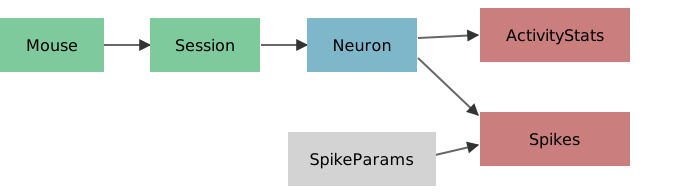
Legend: Green = Manual, Gray = Lookup, Blue = Imported, Orange = Computed
Each session records from neurons. We compute statistics, detect spikes with configurable thresholds, and extract spike waveforms.
Why <npy@> Instead of <blob@>?
| Feature | <npy@> |
<blob@> |
|---|---|---|
| Lazy loading | Yes - inspect shape/dtype without download | No - always downloads |
| Memory mapping | Yes - random access via mmap_mode |
No |
| Format | Portable .npy files |
DataJoint serialization |
| Bulk fetch | Safe - returns references | Downloads everything |
| Direct access | Yes - navigable file paths | No - hash-addressed |
Setup
First, configure object storage for the <npy@> codec.
import datajoint as dj
import numpy as np
import matplotlib.pyplot as plt
from pathlib import Path
import tempfile

# Create a temporary directory for object storage
STORE_PATH = tempfile.mkdtemp(prefix='dj_ephys_')

# Configure object storage with partitioning by mouse_id, session_date, and neuron_id
dj.config.stores['ephys'] = {
    'protocol': 'file',
    'location': STORE_PATH,
    'partition_pattern': '{mouse_id}/{session_date}/{neuron_id}',  # Partition by subject, session, and neuron
}

schema = dj.Schema('tutorial_electrophysiology_npy')

# Data directory (relative to this notebook)
DATA_DIR = Path('./data')

print(f"Store configured at: {STORE_PATH}")
print("Partitioning: {mouse_id}/{session_date}/{neuron_id}")
[2026-08-13 12:44:33] DataJoint 2.3.3.dev12+g3f8a79c0f connected to postgres@postgres:5432
Store configured at: /tmp/dj_ephys_dxt6qyqs
Partitioning: {mouse_id}/{session_date}/{neuron_id}
Partitioning by Subject, Session, and Neuron
We've configured the store with partition_pattern: '{mouse_id}/{session_date}/{neuron_id}'. This organizes storage by the complete experimental hierarchy—grouping all data for each individual neuron together at the top of the directory structure.
Without partitioning:
{store}/{schema}/{table}/{mouse_id=X}/{session_date=Y}/{neuron_id=Z}/file.npy
With partitioning:
{store}/{mouse_id=X}/{session_date=Y}/{neuron_id=Z}/{schema}/{table}/file.npy
Partitioning moves the specified primary key attributes to the front of the path, making it easy to:
- Browse by experimental hierarchy - Navigate: subject → session → neuron
- Selective sync - Copy all data for one neuron:
rsync mouse_id=100/session_date=2017-05-25/neuron_id=0/ backup/ - Efficient queries - Filesystem can quickly locate specific neurons
- Publication-ready - Export complete hierarchies to data repositories
The remaining primary key attributes (like spike_param_id in the Spikes table) stay in their normal position after the schema/table path.
Manual Tables: Experiment Metadata
@schema
class Mouse(dj.Manual):
    definition = """
    mouse_id : int32
    ---
    dob : date
    sex : enum('M', 'F', 'unknown')
    """


@schema
class Session(dj.Manual):
    definition = """
    -> Mouse
    session_date : date
    ---
    experimenter : varchar(100)
    """
Insert Sample Data
Our data files follow the naming convention data_{mouse_id}_{session_date}.npy.
# Insert mice
Mouse.insert([
    {'mouse_id': 0, 'dob': '2017-03-01', 'sex': 'M'},
    {'mouse_id': 5, 'dob': '2016-12-25', 'sex': 'F'},
    {'mouse_id': 100, 'dob': '2017-05-12', 'sex': 'F'},
], skip_duplicates=True)

# Insert sessions (matching our data files)
Session.insert([
    {'mouse_id': 0, 'session_date': '2017-05-15', 'experimenter': 'Alice'},
    {'mouse_id': 0, 'session_date': '2017-05-19', 'experimenter': 'Alice'},
    {'mouse_id': 5, 'session_date': '2017-01-05', 'experimenter': 'Bob'},
    {'mouse_id': 100, 'session_date': '2017-05-25', 'experimenter': 'Carol'},
    {'mouse_id': 100, 'session_date': '2017-06-01', 'experimenter': 'Carol'},
], skip_duplicates=True)

Session()
| mouse_id | session_date | experimenter |
|---|---|---|
| 0 | 2017-05-15 | Alice |
| 0 | 2017-05-19 | Alice |
| 5 | 2017-01-05 | Bob |
| 100 | 2017-05-25 | Carol |
| 100 | 2017-06-01 | Carol |
Total: 5
Imported Table: Neuron Activity with <npy@>
Each data file contains recordings from one or more neurons. We import each neuron's activity trace using <npy@ephys> for schema-addressed object storage.
@schema
class Neuron(dj.Imported):
    definition = """
    -> Session
    neuron_id : int16
    ---
    activity : <npy@ephys>    # neural activity trace (lazy loading)
    """

    def make(self, key):
        # Construct filename from key
        filename = f"data_{key['mouse_id']}_{key['session_date']}.npy"
        filepath = DATA_DIR / filename

        # Load data (shape: n_neurons x n_timepoints)
        data = np.load(filepath)

        # Insert one row per neuron
        for neuron_id, activity in enumerate(data):
            self.insert1({
                **key,
                'neuron_id': neuron_id,
                'activity': activity
            })

        print(f"Imported {len(data)} neuron(s) from {filename}")
Neuron.populate(display_progress=True)
Neuron: 0%| | 0/5 [00:00<?, ?it/s]
Neuron: 100%|██████████| 5/5 [00:00<00:00, 117.05it/s]
Imported 1 neuron(s) from data_0_2017-05-15.npy
Imported 1 neuron(s) from data_0_2017-05-19.npy
Imported 1 neuron(s) from data_5_2017-01-05.npy
Imported 1 neuron(s) from data_100_2017-05-25.npy
Imported 1 neuron(s) from data_100_2017-06-01.npy
{'success_count': 5, 'error_list': []}
Neuron()
| mouse_id | session_date | neuron_id | activity |
|---|---|---|---|
| 0 | 2017-05-15 | 0 | <npy> |
| 0 | 2017-05-19 | 0 | <npy> |
| 5 | 2017-01-05 | 0 | <npy> |
| 100 | 2017-05-25 | 0 | <npy> |
| 100 | 2017-06-01 | 0 | <npy> |
Total: 5
Lazy Loading with NpyRef
When fetching <npy@> attributes, you get an NpyRef that provides metadata without downloading the array.
# Fetch returns NpyRef, not the array
key = {'mouse_id': 0, 'session_date': '2017-05-15', 'neuron_id': 0}
ref = (Neuron & key).fetch1('activity')

print(f"Type: {type(ref).__name__}")
print(f"Shape: {ref.shape} (no download!)")
print(f"Dtype: {ref.dtype}")
print(f"Is loaded: {ref.is_loaded}")
Type: NpyRef
Shape: (1000,) (no download!)
Dtype: float64
Is loaded: False
# Explicitly load when ready
activity = ref.load()
print(f"Loaded: {activity.shape}, is_loaded: {ref.is_loaded}")
Loaded: (1000,), is_loaded: True
Memory Mapping for Large Arrays
For very large arrays, use mmap_mode to access data without loading it all into memory. This is especially efficient for local filesystem stores.
# Memory-mapped loading - efficient for large arrays
key = {'mouse_id': 0, 'session_date': '2017-05-15', 'neuron_id': 0}
ref = (Neuron & key).fetch1('activity')

# Load as memory-mapped array (read-only)
mmap_arr = ref.load(mmap_mode='r')

print(f"Type: {type(mmap_arr).__name__}")
print(f"Shape: {mmap_arr.shape}")

# Random access only reads the needed portion from disk
slice_data = mmap_arr[100:200]
print(f"Slice [100:200]: {slice_data[:5]}...")
Type: memmap
Shape: (1000,)
Slice [100:200]: [-0.09536487  0.00759549 -0.14405436 -0.08785159 -0.14242823]...
Visualize Neural Activity
NpyRef works transparently with NumPy functions via __array__.
fig, axes = plt.subplots(2, 3, figsize=(12, 6))

for ax, key in zip(axes.ravel(), Neuron.keys()):
    # fetch1 returns NpyRef, but plotting works via __array__
    activity = (Neuron & key).fetch1('activity')
    ax.plot(np.asarray(activity))  # Convert to array for plotting
    ax.set_title(f"Mouse {key['mouse_id']}, {key['session_date']}")
    ax.set_xlabel('Time bin')
    ax.set_ylabel('Activity')

# Hide unused subplot
axes[1, 2].axis('off')
plt.tight_layout()

Computed Table: Activity Statistics
For each neuron, compute basic statistics of the activity trace. NumPy functions work directly with NpyRef.
@schema
class ActivityStats(dj.Computed):
    definition = """
    -> Neuron
    ---
    mean_activity : float32
    std_activity : float32
    max_activity : float32
    """

    def make(self, key):
        # fetch1 returns NpyRef, but np.mean/std/max work via __array__
        activity = (Neuron & key).fetch1('activity')

        self.insert1({
            **key,
            'mean_activity': np.mean(activity),  # Auto-loads via __array__
            'std_activity': np.std(activity),
            'max_activity': np.max(activity)
        })
ActivityStats.populate(display_progress=True)
ActivityStats()
ActivityStats: 0%| | 0/5 [00:00<?, ?it/s]
ActivityStats: 100%|██████████| 5/5 [00:00<00:00, 966.30it/s]
| mouse_id | session_date | neuron_id | mean_activity | std_activity | max_activity |
|---|---|---|---|---|---|
| 0 | 2017-05-15 | 0 | 0.20735653 | 0.40086678 | 2.481606 |
| 0 | 2017-05-19 | 0 | 0.1327401 | 0.2914616 | 1.8280541 |
| 5 | 2017-01-05 | 0 | 0.089178555 | 0.23641196 | 1.3738891 |
| 100 | 2017-05-25 | 0 | 0.21906962 | 0.32878324 | 1.7638324 |
| 100 | 2017-06-01 | 0 | 0.08732656 | 0.23785825 | 1.324542 |
Total: 5
Lookup Table: Spike Detection Parameters
Spike detection depends on threshold choice. Using a Lookup table, we can run detection with multiple thresholds and compare results.
@schema
class SpikeParams(dj.Lookup):
    definition = """
    spike_param_id : int16
    ---
    threshold : float32    # spike detection threshold
    """

    contents = [
        {'spike_param_id': 1, 'threshold': 0.5},
        {'spike_param_id': 2, 'threshold': 0.9},
    ]

SpikeParams()
| spike_param_id | threshold |
|---|---|
| 1 | 0.5 |
| 2 | 0.9 |
Total: 2
Computed Table: Spike Detection
Detect spikes by finding threshold crossings. Store spike times and all waveforms as <npy@> arrays.
@schema
class Spikes(dj.Computed):
    definition = """
    -> Neuron
    -> SpikeParams
    ---
    spike_times : <npy@ephys>    # indices of detected spikes
    spike_count : int64         # total number of spikes
    waveforms : <npy@ephys>      # all waveforms stacked (n_spikes x window_size)
    """

    def make(self, key):
        # Fetch inputs - activity is NpyRef
        activity_ref = (Neuron & key).fetch1('activity')
        threshold = (SpikeParams & key).fetch1('threshold')

        # Load activity for processing
        activity = activity_ref.load()

        # Detect threshold crossings (rising edge)
        above_threshold = (activity > threshold).astype(int)
        rising_edge = np.diff(above_threshold) > 0
        spike_times = np.where(rising_edge)[0] + 1  # +1 to get crossing point

        # Extract waveforms for all spikes
        window = 40  # samples before and after spike
        waveforms = []
        for t in spike_times:
            # Skip spikes too close to edges
            if t < window or t >= len(activity) - window:
                continue
            waveforms.append(activity[t - window : t + window])

        # Stack into 2D array (n_spikes x window_size)
        waveforms = np.vstack(waveforms) if waveforms else np.empty((0, 2 * window))

        # Insert entry with all data
        self.insert1({
            **key,
            'spike_times': spike_times,
            'spike_count': len(spike_times),
            'waveforms': waveforms,  # All waveforms as single array
        })
Spikes.populate(display_progress=True)
Spikes: 0%| | 0/10 [00:00<?, ?it/s]
Spikes: 100%|██████████| 10/10 [00:00<00:00, 695.27it/s]
{'success_count': 10, 'error_list': []}
# View spike counts for each neuron x parameter combination
Spikes.proj('spike_count')
| mouse_id | session_date | neuron_id | spike_param_id | spike_count |
|---|---|---|---|---|
| 0 | 2017-05-15 | 0 | 1 | 26 |
| 0 | 2017-05-15 | 0 | 2 | 27 |
| 0 | 2017-05-19 | 0 | 1 | 24 |
| 0 | 2017-05-19 | 0 | 2 | 21 |
| 5 | 2017-01-05 | 0 | 1 | 18 |
| 5 | 2017-01-05 | 0 | 2 | 14 |
| 100 | 2017-05-25 | 0 | 1 | 41 |
| 100 | 2017-05-25 | 0 | 2 | 35 |
| 100 | 2017-06-01 | 0 | 1 | 18 |
| 100 | 2017-06-01 | 0 | 2 | 15 |
Total: 10
Compare Detection Thresholds
# Pick one neuron to visualize
neuron_key = {'mouse_id': 0, 'session_date': '2017-05-15', 'neuron_id': 0}
activity = (Neuron & neuron_key).fetch1('activity').load()  # Explicit load

fig, axes = plt.subplots(2, 1, figsize=(12, 6), sharex=True)

for ax, param_id in zip(axes, [1, 2]):
    key = {**neuron_key, 'spike_param_id': param_id}
    spike_times_ref = (Spikes & key).fetch1('spike_times')
    spike_times = spike_times_ref.load()  # Load spike times
    spike_count = (Spikes & key).fetch1('spike_count')
    threshold = (SpikeParams & {'spike_param_id': param_id}).fetch1('threshold')

    ax.plot(activity, 'b-', alpha=0.7, label='Activity')
    ax.axhline(threshold, color='r', linestyle='--', label=f'Threshold={threshold}')
    ax.scatter(spike_times, activity[spike_times], color='red', s=20, zorder=5)
    ax.set_title(f'Threshold={threshold}: {spike_count} spikes detected')
    ax.set_ylabel('Activity')
    ax.legend(loc='upper right')

axes[1].set_xlabel('Time bin')
plt.tight_layout()

Average Waveform
# Get waveforms for one neuron with threshold=0.5
key = {'mouse_id': 100, 'session_date': '2017-05-25', 'neuron_id': 0, 'spike_param_id': 1}

# Fetch waveforms NpyRef directly from Spikes table
waveforms_ref = (Spikes & key).fetch1('waveforms')

# Load the waveform matrix
waveform_matrix = waveforms_ref.load()

if len(waveform_matrix) > 0:
    plt.figure(figsize=(8, 4))
    # Plot individual waveforms (light)
    for wf in waveform_matrix:
        plt.plot(wf, 'b-', alpha=0.2)
    # Plot mean waveform (bold)
    plt.plot(waveform_matrix.mean(axis=0), 'r-', linewidth=2, label='Mean waveform')
    plt.axvline(40, color='k', linestyle='--', alpha=0.5, label='Spike time')
    plt.xlabel('Sample (relative to spike)')
    plt.ylabel('Activity')
    plt.title(f'Spike Waveforms (n={len(waveform_matrix)})')
    plt.legend()
else:
    print("No waveforms found for this key")

Bulk Fetch with Lazy Loading
Fetching many rows returns NpyRefs - inspect metadata before downloading.
# Fetch all neurons - returns NpyRefs, NOT arrays
all_neurons = Neuron.to_dicts()
print(f"Fetched {len(all_neurons)} neurons\n")

# Inspect metadata without downloading
for neuron in all_neurons:
    ref = neuron['activity']
    print(f"Mouse {neuron['mouse_id']}, {neuron['session_date']}: "
          f"shape={ref.shape}, loaded={ref.is_loaded}")
Fetched 5 neurons

Mouse 0, 2017-05-15: shape=(1000,), loaded=False
Mouse 0, 2017-05-19: shape=(1000,), loaded=False
Mouse 5, 2017-01-05: shape=(1000,), loaded=False
Mouse 100, 2017-05-25: shape=(1000,), loaded=False
Mouse 100, 2017-06-01: shape=(1000,), loaded=False
Pipeline Diagram
dj.Diagram(schema)

Querying Results
DataJoint makes it easy to query across the pipeline.
# Find neurons with high spike counts (threshold=0.5)
(Spikes & 'spike_param_id = 1' & 'spike_count > 20').proj('spike_count')
| mouse_id | session_date | neuron_id | spike_param_id | spike_count |
|---|---|---|---|---|
| 0 | 2017-05-15 | 0 | 1 | 26 |
| 0 | 2017-05-19 | 0 | 1 | 24 |
| 100 | 2017-05-25 | 0 | 1 | 41 |
Total: 3
# Join with Mouse to see which mice have most spikes
(Mouse * Session * Spikes & 'spike_param_id = 1').proj('spike_count')
| mouse_id | session_date | neuron_id | spike_param_id | spike_count |
|---|---|---|---|---|
| 0 | 2017-05-15 | 0 | 1 | 26 |
| 0 | 2017-05-19 | 0 | 1 | 24 |
| 5 | 2017-01-05 | 0 | 1 | 18 |
| 100 | 2017-05-25 | 0 | 1 | 41 |
| 100 | 2017-06-01 | 0 | 1 | 18 |
Total: 5
Summary
This pipeline demonstrates key patterns for electrophysiology analysis with object storage:
| Concept | Example | Purpose |
|---|---|---|
| Object storage | <npy@ephys> |
Store arrays in file/S3/MinIO |
| Lazy loading | NpyRef |
Inspect shape/dtype without download |
| Memory mapping | ref.load(mmap_mode='r') |
Random access to large arrays |
| Imported tables | Neuron |
Load data from files |
| Computed tables | ActivityStats, Spikes |
Derive results |
| Lookup tables | SpikeParams |
Parameterize analysis |
| Array attributes | waveforms |
Store multi-spike data as single array |
Key Benefits of <npy@>
- Lazy loading: Inspect array metadata without downloading
- Memory mapping: Random access to large arrays via
mmap_mode - Safe bulk fetch: Fetching 1000 rows doesn't download 1000 arrays
- NumPy integration:
np.mean(ref)auto-downloads via__array__ - Portable format:
.npyfiles readable by NumPy, MATLAB, etc. - Schema-addressed: Files organized by schema/table/key
- Direct access: Navigate and load files without database queries
Direct File Access: Navigating the Store
A key advantage of <npy@> is schema-addressed storage: files are organized in a predictable directory structure that mirrors your database schema. This means you can navigate and access data files directly—without querying the database.
Store Directory Structure with Partitioning
This tutorial uses partition_pattern: '{mouse_id}/{session_date}/{neuron_id}' to organize files by the complete experimental hierarchy:
{store}/{mouse_id=X}/{session_date=Y}/{neuron_id=Z}/{schema}/{table}/{remaining_key}/{file}.npy
Without partitioning, the structure would be:
{store}/{schema}/{table}/{mouse_id=X}/{session_date=Y}/{neuron_id=Z}/{remaining_key}/{file}.npy
Partitioning moves the experimental hierarchy to the top of the path, creating a browsable structure that matches how you think about your data:
- Navigate to a subject (mouse_id=100)
- Navigate to a session (session_date=2017-05-25)
- Navigate to a neuron (neuron_id=0)
- See all data for that neuron organized by table
This structure enables:
- Direct file access for external tools (MATLAB, Julia, shell scripts)
- Browsable data organized by subject/session/neuron
- Selective backup/sync - Copy entire subjects, sessions, or individual neurons
- Debugging by inspecting raw files in the experimental hierarchy
# Explore the store directory structure
from pathlib import Path

print(f"Store location: {STORE_PATH}\n")
print("Directory structure (one subject shown in full):")

def print_tree(directory, prefix="", max_depth=7, current_depth=0, limit_items=True):
    """Print directory tree with limited depth."""
    if current_depth >= max_depth:
        return

    try:
        entries = sorted(Path(directory).iterdir())
    except PermissionError:
        return

    dirs = [e for e in entries if e.is_dir()]
    files = [e for e in entries if e.is_file()]

    # At depth 0 (root), only show first subject in detail
    if current_depth == 0 and limit_items:
        dirs = dirs[:1]  # Only show first mouse_id

    # Show directories
    for i, d in enumerate(dirs):
        is_last_dir = (i == len(dirs) - 1) and len(files) == 0
        connector = "└── " if is_last_dir else "├── "
        print(f"{prefix}{connector}{d.name}/")

        extension = "    " if is_last_dir else "│   "
        print_tree(d, prefix + extension, max_depth, current_depth + 1, limit_items=False)

    if current_depth == 0 and limit_items and len(sorted(Path(directory).iterdir(), key=lambda x: x.is_file())) > 1:
        total_mice = len([e for e in Path(directory).iterdir() if e.is_dir()])
        if total_mice > 1:
            print(f"{prefix}└── ... and {total_mice - 1} more subjects (mouse_id=5, mouse_id=100)")

    # Show files
    for i, f in enumerate(files):
        is_last = i == len(files) - 1
        connector = "└── " if is_last else "├── "
        size_kb = f.stat().st_size / 1024
        print(f"{prefix}{connector}{f.name} ({size_kb:.1f} KB)")

print_tree(STORE_PATH)
Store location: /tmp/dj_ephys_dxt6qyqs

Directory structure (one subject shown in full):
└── _schema/
    ├── mouse_id=0/
    │   ├── session_date=2017-05-15/
    │   │   └── neuron_id=0/
    │   │       └── tutorial_electrophysiology_npy/
    │   │           ├── __spikes/
    │   │           │   ├── spike_param_id=1/
    │   │           │   └── spike_param_id=2/
    │   │           └── _neuron/
    │   │               └── activity_9gm8pI-h.npy (7.9 KB)
    │   └── session_date=2017-05-19/
    │       └── neuron_id=0/
    │           └── tutorial_electrophysiology_npy/
    │               ├── __spikes/
    │               │   ├── spike_param_id=1/
    │               │   └── spike_param_id=2/
    │               └── _neuron/
    │                   └── activity_Pug56xsy.npy (7.9 KB)
    ├── mouse_id=100/
    │   ├── session_date=2017-05-25/
    │   │   └── neuron_id=0/
    │   │       └── tutorial_electrophysiology_npy/
    │   │           ├── __spikes/
    │   │           │   ├── spike_param_id=1/
    │   │           │   └── spike_param_id=2/
    │   │           └── _neuron/
    │   │               └── activity_KYosp6vz.npy (7.9 KB)
    │   └── session_date=2017-06-01/
    │       └── neuron_id=0/
    │           └── tutorial_electrophysiology_npy/
    │               ├── __spikes/
    │               │   ├── spike_param_id=1/
    │               │   └── spike_param_id=2/
    │               └── _neuron/
    │                   └── activity_PmRN40yM.npy (7.9 KB)
    └── mouse_id=5/
        └── session_date=2017-01-05/
            └── neuron_id=0/
                └── tutorial_electrophysiology_npy/
                    ├── __spikes/
                    │   ├── spike_param_id=1/
                    │   └── spike_param_id=2/
                    └── _neuron/
                        └── activity_VNXUheB-.npy (7.9 KB)
# Get the actual path from an NpyRef
key = {'mouse_id': 0, 'session_date': '2017-05-15', 'neuron_id': 0}
ref = (Neuron & key).fetch1('activity')

print(f"NpyRef path (relative): {ref.path}")
print(f"Full path: {Path(STORE_PATH) / ref.path}\n")

# Load directly with NumPy - bypass the database!
direct_path = Path(STORE_PATH) / ref.path
activity_direct = np.load(direct_path)
print(f"Loaded array: shape={activity_direct.shape}, dtype={activity_direct.dtype}")
print(f"First 5 values: {activity_direct[:5]}")
NpyRef path (relative): _schema/mouse_id=0/session_date=2017-05-15/neuron_id=0/tutorial_electrophysiology_npy/_neuron/activity_9gm8pI-h.npy
Full path: /tmp/dj_ephys_dxt6qyqs/_schema/mouse_id=0/session_date=2017-05-15/neuron_id=0/tutorial_electrophysiology_npy/_neuron/activity_9gm8pI-h.npy

Loaded array: shape=(1000,), dtype=float64
First 5 values: [0.35788741 0.44753156 0.19641299 0.39111449 0.17669518]
# Find all .npy files for a specific mouse using filesystem tools
# This works without any database query!

store_path = Path(STORE_PATH)
all_npy_files = list(store_path.rglob("*.npy"))

print(f"All .npy files in store ({len(all_npy_files)} total):\n")
for f in sorted(all_npy_files)[:8]:
    rel_path = f.relative_to(STORE_PATH)
    size_kb = f.stat().st_size / 1024
    print(f"  {rel_path} ({size_kb:.1f} KB)")
if len(all_npy_files) > 8:
    print(f"  ... and {len(all_npy_files) - 8} more files")
All .npy files in store (25 total):

  _schema/mouse_id=0/session_date=2017-05-15/neuron_id=0/tutorial_electrophysiology_npy/__spikes/spike_param_id=1/spike_times_S1cUI32z.npy (0.3 KB)
  _schema/mouse_id=0/session_date=2017-05-15/neuron_id=0/tutorial_electrophysiology_npy/__spikes/spike_param_id=1/waveforms_ZIZ4am_S.npy (15.1 KB)
  _schema/mouse_id=0/session_date=2017-05-15/neuron_id=0/tutorial_electrophysiology_npy/__spikes/spike_param_id=2/spike_times_UDoZwKLq.npy (0.3 KB)
  _schema/mouse_id=0/session_date=2017-05-15/neuron_id=0/tutorial_electrophysiology_npy/__spikes/spike_param_id=2/waveforms_rAQEd6v_.npy (15.8 KB)
  _schema/mouse_id=0/session_date=2017-05-15/neuron_id=0/tutorial_electrophysiology_npy/_neuron/activity_9gm8pI-h.npy (7.9 KB)
  _schema/mouse_id=0/session_date=2017-05-19/neuron_id=0/tutorial_electrophysiology_npy/__spikes/spike_param_id=1/spike_times_eC6OPTkm.npy (0.3 KB)
  _schema/mouse_id=0/session_date=2017-05-19/neuron_id=0/tutorial_electrophysiology_npy/__spikes/spike_param_id=1/waveforms_XrRxeIwP.npy (14.5 KB)
  _schema/mouse_id=0/session_date=2017-05-19/neuron_id=0/tutorial_electrophysiology_npy/__spikes/spike_param_id=2/spike_times_gecAKQ9o.npy (0.3 KB)
  ... and 17 more files
Use Cases for Direct Access
External tools: Load data in MATLAB, Julia, or R without DataJoint:
% MATLAB - use the path from NpyRef or navigate the store
activity = readNPY('store/schema/table/key_hash/activity.npy');
Shell scripting: Process files with command-line tools:
# List all .npy files in store
find $STORE -name "*.npy"

# Backup the entire store
rsync -av $STORE/ backup/
Disaster recovery: If the database is lost, the store contains all array data in standard .npy format. The path structure and JSON metadata in the database can help reconstruct mappings.
Publishing to Data Repositories
Many scientific data repositories accept structured file-folder hierarchies—exactly what <npy@> provides. The schema-addressed storage format makes your data publication-ready:
| Repository | Accepted Formats | Schema-Addressed Benefit |
|---|---|---|
| DANDI | NWB, folders | Export subject/session hierarchy |
| OpenNeuro | BIDS folders | Map to BIDS-like structure |
| Figshare | Any files/folders | Upload store directly |
| Zenodo | Any files/folders | Archive with DOI |
| OSF | Any files/folders | Version-controlled sharing |
Export for publication:
# Export one subject's data for publication
subject_dir = Path(STORE_PATH) / "schema" / "table" / "objects" / "mouse_id=100"

# Copy to publication directory
import shutil
shutil.copytree(subject_dir, "publication_data/mouse_100/")

# The resulting structure is self-documenting:
# publication_data/
#   mouse_100/
#     session_date=2017-05-25/
#       neuron_id=0/
#         activity_xyz.npy
#         spike_times_abc.npy
#         waveforms_def.npy
Key advantages for publishing:
- Self-documenting paths: Primary key values are in folder names—no lookup table needed
- Standard format:
.npyfiles are readable by NumPy, MATLAB, Julia, R, and most analysis tools - Selective export: Copy only specific subjects, sessions, or tables
- Reproducibility: Published data has the same structure as your working pipeline
- Metadata preservation: Path encodes experimental metadata (subject, session, parameters)
# Cleanup: drop schema and remove temporary store
schema.drop(prompt=False)
import shutil
shutil.rmtree(STORE_PATH, ignore_errors=True)