Electrophysiology Pipeline
This tutorial builds an electrophysiology analysis pipeline using DataJoint. You'll learn to:
- Import neural recordings from data files
- Compute activity statistics
- Detect spikes using parameterized thresholds
- Extract waveforms using Part tables
The Pipeline
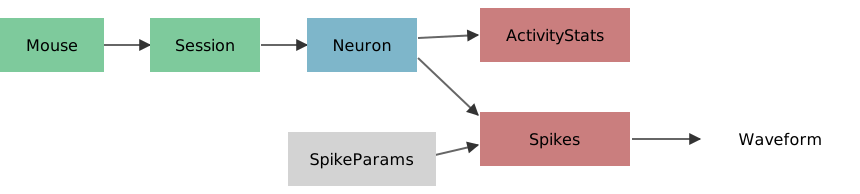
Legend: Green = Manual, Gray = Lookup, Blue = Imported, Red = Computed, White = Part
Each session records from neurons. We compute statistics, detect spikes with configurable thresholds, and extract spike waveforms.
Setup
import datajoint as dj
import numpy as np
import matplotlib.pyplot as plt
from pathlib import Path

schema = dj.Schema('tutorial_electrophysiology')

# Data directory (relative to this notebook)
DATA_DIR = Path('./data')
[2026-02-19 18:32:53] DataJoint 2.1.1 connected to postgres@postgres:5432
Manual Tables: Experiment Metadata
@schema
class Mouse(dj.Manual):
    definition = """
    mouse_id : int32
    ---
    dob : date
    sex : enum('M', 'F', 'unknown')
    """


@schema
class Session(dj.Manual):
    definition = """
    -> Mouse
    session_date : date
    ---
    experimenter : varchar(100)
    """
Insert Sample Data
Our data files follow the naming convention data_{mouse_id}_{session_date}.npy.
# Insert mice
Mouse.insert([
    {'mouse_id': 0, 'dob': '2017-03-01', 'sex': 'M'},
    {'mouse_id': 5, 'dob': '2016-12-25', 'sex': 'F'},
    {'mouse_id': 100, 'dob': '2017-05-12', 'sex': 'F'},
], skip_duplicates=True)

# Insert sessions (matching our data files)
Session.insert([
    {'mouse_id': 0, 'session_date': '2017-05-15', 'experimenter': 'Alice'},
    {'mouse_id': 0, 'session_date': '2017-05-19', 'experimenter': 'Alice'},
    {'mouse_id': 5, 'session_date': '2017-01-05', 'experimenter': 'Bob'},
    {'mouse_id': 100, 'session_date': '2017-05-25', 'experimenter': 'Carol'},
    {'mouse_id': 100, 'session_date': '2017-06-01', 'experimenter': 'Carol'},
], skip_duplicates=True)

Session()
| mouse_id | session_date | experimenter |
|---|---|---|
| 0 | 2017-05-15 | Alice |
| 0 | 2017-05-19 | Alice |
| 5 | 2017-01-05 | Bob |
| 100 | 2017-05-25 | Carol |
| 100 | 2017-06-01 | Carol |
Total: 5
Imported Table: Neuron Activity
Each data file contains recordings from one or more neurons. We import each neuron's activity trace.
@schema
class Neuron(dj.Imported):
    definition = """
    -> Session
    neuron_id : int16
    ---
    activity : <blob>    # neural activity trace
    """

    def make(self, key):
        # Construct filename from key
        filename = f"data_{key['mouse_id']}_{key['session_date']}.npy"
        filepath = DATA_DIR / filename

        # Load data (shape: n_neurons x n_timepoints)
        data = np.load(filepath)

        # Insert one row per neuron
        for neuron_id, activity in enumerate(data):
            self.insert1({
                **key,
                'neuron_id': neuron_id,
                'activity': activity
            })

        print(f"Imported {len(data)} neuron(s) from {filename}")
Neuron.populate(display_progress=True)
Neuron: 0%| | 0/5 [00:00<?, ?it/s]
Neuron: 100%|██████████| 5/5 [00:00<00:00, 380.61it/s]
Imported 1 neuron(s) from data_0_2017-05-15.npy
Imported 1 neuron(s) from data_0_2017-05-19.npy
Imported 1 neuron(s) from data_5_2017-01-05.npy
Imported 1 neuron(s) from data_100_2017-05-25.npy
Imported 1 neuron(s) from data_100_2017-06-01.npy
{'success_count': 5, 'error_list': []}
Neuron()
| mouse_id | session_date | neuron_id | activity |
|---|---|---|---|
| 0 | 2017-05-15 | 0 | <blob> |
| 0 | 2017-05-19 | 0 | <blob> |
| 5 | 2017-01-05 | 0 | <blob> |
| 100 | 2017-05-25 | 0 | <blob> |
| 100 | 2017-06-01 | 0 | <blob> |
Total: 5
Visualize Neural Activity
fig, axes = plt.subplots(2, 3, figsize=(12, 6))

for ax, key in zip(axes.ravel(), Neuron.keys()):
    activity = (Neuron & key).fetch1('activity')
    ax.plot(activity)
    ax.set_title(f"Mouse {key['mouse_id']}, {key['session_date']}")
    ax.set_xlabel('Time bin')
    ax.set_ylabel('Activity')

# Hide unused subplot
axes[1, 2].axis('off')
plt.tight_layout()

Computed Table: Activity Statistics
For each neuron, compute basic statistics of the activity trace.
@schema
class ActivityStats(dj.Computed):
    definition = """
    -> Neuron
    ---
    mean_activity : float32
    std_activity : float32
    max_activity : float32
    """

    def make(self, key):
        activity = (Neuron & key).fetch1('activity')

        self.insert1({
            **key,
            'mean_activity': activity.mean(),
            'std_activity': activity.std(),
            'max_activity': activity.max()
        })
ActivityStats.populate(display_progress=True)
ActivityStats()
ActivityStats: 0%| | 0/5 [00:00<?, ?it/s]
ActivityStats: 100%|██████████| 5/5 [00:00<00:00, 1178.51it/s]
| mouse_id | session_date | neuron_id | mean_activity | std_activity | max_activity |
|---|---|---|---|---|---|
| 0 | 2017-05-15 | 0 | 0.20735653 | 0.40086678 | 2.481606 |
| 0 | 2017-05-19 | 0 | 0.1327401 | 0.2914616 | 1.8280541 |
| 5 | 2017-01-05 | 0 | 0.089178555 | 0.23641196 | 1.3738891 |
| 100 | 2017-05-25 | 0 | 0.21906962 | 0.32878324 | 1.7638324 |
| 100 | 2017-06-01 | 0 | 0.08732656 | 0.23785825 | 1.324542 |
Total: 5
Lookup Table: Spike Detection Parameters
Spike detection depends on threshold choice. Using a Lookup table, we can run detection with multiple thresholds and compare results.
@schema
class SpikeParams(dj.Lookup):
    definition = """
    spike_param_id : int16
    ---
    threshold : float32    # spike detection threshold
    """

    contents = [
        {'spike_param_id': 1, 'threshold': 0.5},
        {'spike_param_id': 2, 'threshold': 0.9},
    ]

SpikeParams()
| spike_param_id | threshold |
|---|---|
| 1 | 0.5 |
| 2 | 0.9 |
Total: 2
Computed Table with Part Table: Spike Detection
Detect spikes by finding threshold crossings. Store:
- Master table: spike count and binary spike array
- Part table: waveform for each spike
@schema
class Spikes(dj.Computed):
    definition = """
    -> Neuron
    -> SpikeParams
    ---
    spike_times : <blob>    # indices of detected spikes
    spike_count : int32     # total number of spikes
    """

    class Waveform(dj.Part):
        definition = """
        -> master
        spike_idx : int32
        ---
        waveform : <blob>    # activity around spike (±40 samples)
        """

    def make(self, key):
        # Fetch inputs
        activity = (Neuron & key).fetch1('activity')
        threshold = (SpikeParams & key).fetch1('threshold')

        # Detect threshold crossings (rising edge)
        above_threshold = (activity > threshold).astype(int)
        rising_edge = np.diff(above_threshold) > 0
        spike_times = np.where(rising_edge)[0] + 1  # +1 to get crossing point

        # Insert master entry
        self.insert1({
            **key,
            'spike_times': spike_times,
            'spike_count': len(spike_times)
        })

        # Extract and insert waveforms
        window = 40  # samples before and after spike
        for spike_idx, t in enumerate(spike_times):
            # Skip spikes too close to edges
            if t < window or t >= len(activity) - window:
                continue

            waveform = activity[t - window : t + window]
            self.Waveform.insert1({
                **key,
                'spike_idx': spike_idx,
                'waveform': waveform
            })
Spikes.populate(display_progress=True)
Spikes: 0%| | 0/10 [00:00<?, ?it/s]
Spikes: 100%|██████████| 10/10 [00:00<00:00, 272.33it/s]
{'success_count': 10, 'error_list': []}
# View spike counts for each neuron × parameter combination
Spikes.proj('spike_count')
| mouse_id | session_date | neuron_id | spike_param_id | spike_count |
|---|---|---|---|---|
| 0 | 2017-05-15 | 0 | 1 | 26 |
| 0 | 2017-05-15 | 0 | 2 | 27 |
| 0 | 2017-05-19 | 0 | 1 | 24 |
| 0 | 2017-05-19 | 0 | 2 | 21 |
| 5 | 2017-01-05 | 0 | 1 | 18 |
| 5 | 2017-01-05 | 0 | 2 | 14 |
| 100 | 2017-05-25 | 0 | 1 | 41 |
| 100 | 2017-05-25 | 0 | 2 | 35 |
| 100 | 2017-06-01 | 0 | 1 | 18 |
| 100 | 2017-06-01 | 0 | 2 | 15 |
Total: 10
Compare Detection Thresholds
# Pick one neuron to visualize
neuron_key = {'mouse_id': 0, 'session_date': '2017-05-15', 'neuron_id': 0}
activity = (Neuron & neuron_key).fetch1('activity')

fig, axes = plt.subplots(2, 1, figsize=(12, 6), sharex=True)

for ax, param_id in zip(axes, [1, 2]):
    key = {**neuron_key, 'spike_param_id': param_id}
    spike_times, spike_count = (Spikes & key).fetch1('spike_times', 'spike_count')
    threshold = (SpikeParams & {'spike_param_id': param_id}).fetch1('threshold')

    ax.plot(activity, 'b-', alpha=0.7, label='Activity')
    ax.axhline(threshold, color='r', linestyle='--', label=f'Threshold={threshold}')
    ax.scatter(spike_times, activity[spike_times], color='red', s=20, zorder=5)
    ax.set_title(f'Threshold={threshold}: {spike_count} spikes detected')
    ax.set_ylabel('Activity')
    ax.legend(loc='upper right')

axes[1].set_xlabel('Time bin')
plt.tight_layout()

Average Waveform
# Get waveforms for one neuron with threshold=0.5
key = {'mouse_id': 100, 'session_date': '2017-05-25', 'neuron_id': 0, 'spike_param_id': 1}
waveforms = (Spikes.Waveform & key).to_arrays('waveform')

if len(waveforms) > 0:
    waveform_matrix = np.vstack(waveforms)

    plt.figure(figsize=(8, 4))
    # Plot individual waveforms (light)
    for wf in waveform_matrix:
        plt.plot(wf, 'b-', alpha=0.2)
    # Plot mean waveform (bold)
    plt.plot(waveform_matrix.mean(axis=0), 'r-', linewidth=2, label='Mean waveform')
    plt.axvline(40, color='k', linestyle='--', alpha=0.5, label='Spike time')
    plt.xlabel('Sample (relative to spike)')
    plt.ylabel('Activity')
    plt.title(f'Spike Waveforms (n={len(waveforms)})')
    plt.legend()
else:
    print("No waveforms found for this key")

Pipeline Diagram
dj.Diagram(schema)

Querying Results
DataJoint makes it easy to query across the pipeline.
# Find neurons with high spike counts (threshold=0.5)
(Spikes & 'spike_param_id = 1' & 'spike_count > 20').proj('spike_count')
| mouse_id | session_date | neuron_id | spike_param_id | spike_count |
|---|---|---|---|---|
| 0 | 2017-05-15 | 0 | 1 | 26 |
| 0 | 2017-05-19 | 0 | 1 | 24 |
| 100 | 2017-05-25 | 0 | 1 | 41 |
Total: 3
# Join with Mouse to see which mice have most spikes
(Mouse * Session * Spikes & 'spike_param_id = 1').proj('spike_count')
| mouse_id | session_date | neuron_id | spike_param_id | spike_count |
|---|---|---|---|---|
| 0 | 2017-05-15 | 0 | 1 | 26 |
| 0 | 2017-05-19 | 0 | 1 | 24 |
| 5 | 2017-01-05 | 0 | 1 | 18 |
| 100 | 2017-05-25 | 0 | 1 | 41 |
| 100 | 2017-06-01 | 0 | 1 | 18 |
Total: 5
Summary
This pipeline demonstrates key patterns for electrophysiology analysis:
| Concept | Example | Purpose |
|---|---|---|
| Imported tables | Neuron |
Load data from files |
| Computed tables | ActivityStats, Spikes |
Derive results |
| Lookup tables | SpikeParams |
Parameterize analysis |
| Part tables | Waveform |
Store variable-length results |
| Multi-parent keys | Spikes |
Compute all Neuron × Param combinations |
Key Benefits
- Parameter comparison: Different thresholds stored alongside results
- Automatic tracking:
populate()knows what's computed vs. pending - Cascading: Delete a parameter set, all derived results cascade
- Provenance: Trace any spike back to its source recording
# Cleanup: drop schema for re-running
schema.drop(prompt=False)