A Simple Pipeline
This tutorial introduces DataJoint by building a simple research lab database. You'll learn to:
- Define tables with primary keys and dependencies
- Insert and query data
- Use the four core operations: restriction, projection, join, aggregation
- Understand the schema diagram
We'll work with Manual tables only—tables whose rows are written from outside the table, here by you. A Manual table is not necessarily hand-filled; an instrument or an entry script writes to one the same way. Later tutorials introduce automated computation.
Database Backend: All tutorials work identically on MySQL and PostgreSQL (PostgreSQL support added in DataJoint Library 2.1). The examples shown here were executed on PostgreSQL, but you can follow along using either backend.
For complete working examples, see:
- University Database — Academic records with complex queries
- Blob Detection — Image processing with computation
Setup
import datajoint as dj

schema = dj.Schema('tutorial_first_pipeline')
[2026-08-13 12:44:09] DataJoint 2.3.3.dev12+g3f8a79c0f connected to postgres@postgres:5432
The Domain: A Research Lab
We'll model a research lab that:
- Has researchers who conduct experiments
- Works with subjects (e.g., mice)
- Runs sessions where data is collected
- Collects recordings during each session
Defining Tables
Each table is a Python class. The definition string specifies:
- Primary key (above
---) — uniquely identifies each row - Attributes (below
---) — additional data for each row - Dependencies (
->) — references to other tables
@schema
class Researcher(dj.Manual):
    definition = """
    researcher_id : int32
    ---
    researcher_name : varchar(100)
    email : varchar(100)
    """
@schema
class Subject(dj.Manual):
    definition = """
    subject_id : int32
    ---
    species : varchar(32)
    date_of_birth : date
    sex : enum('M', 'F', 'unknown')
    """
Dependencies
A Session involves one researcher and one subject. The -> syntax creates a dependency (foreign key):
@schema
class Session(dj.Manual):
    definition = """
    -> Subject
    session_date : date
    ---
    -> Researcher
    session_notes : varchar(255)
    """
The -> Subject in the primary key means:
subject_idis automatically included in Session's primary key- Combined with
session_date, each session is uniquely identified - You cannot create a session for a non-existent subject
The -> Researcher below the line is a non-primary dependency—it records who ran the session but isn't part of the unique identifier.
@schema
class Recording(dj.Manual):
    definition = """
    -> Session
    recording_id : int16
    ---
    duration : decimal(5,1)     # recording duration (seconds)
    quality : enum('good', 'fair', 'poor')
    """
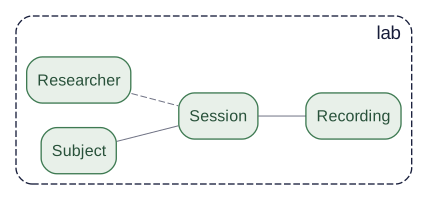
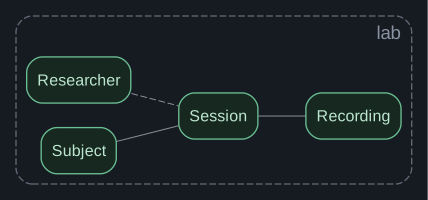
Schema Diagram
The diagram shows tables and their dependencies:
dj.Diagram(schema)

Reading the diagram:
- Green boxes = Manual tables (you enter data)
- Solid lines = Primary key dependencies (part of identity)
- Dashed lines = Non-primary dependencies (references)
Inserting Data
Data must be inserted in dependency order—you can't reference something that doesn't exist.
# First: tables with no dependencies
Researcher.insert([
    {'researcher_id': 1, 'researcher_name': 'Alice Chen',
     'email': 'alice@lab.org'},
    {'researcher_id': 2, 'researcher_name': 'Bob Smith',
     'email': 'bob@lab.org'},
])

Subject.insert([
    {'subject_id': 1, 'species': 'mouse',
     'date_of_birth': '2024-01-15', 'sex': 'M'},
    {'subject_id': 2, 'species': 'mouse',
     'date_of_birth': '2024-01-20', 'sex': 'F'},
    {'subject_id': 3, 'species': 'mouse',
     'date_of_birth': '2024-02-01', 'sex': 'M'},
])
# Then: tables that depend on others
Session.insert([
    {'subject_id': 1, 'session_date': '2024-06-01',
     'researcher_id': 1, 'session_notes': 'First session'},
    {'subject_id': 1, 'session_date': '2024-06-15',
     'researcher_id': 1, 'session_notes': 'Follow-up'},
    {'subject_id': 2, 'session_date': '2024-06-10',
     'researcher_id': 2, 'session_notes': 'Initial recording'},
])
# Finally: tables at the bottom of the hierarchy
Recording.insert([
    {'subject_id': 1, 'session_date': '2024-06-01', 'recording_id': 1,
     'duration': 300.5, 'quality': 'good'},
    {'subject_id': 1, 'session_date': '2024-06-01', 'recording_id': 2,
     'duration': 450.0, 'quality': 'good'},
    {'subject_id': 1, 'session_date': '2024-06-15', 'recording_id': 1,
     'duration': 600.0, 'quality': 'fair'},
    {'subject_id': 2, 'session_date': '2024-06-10', 'recording_id': 1,
     'duration': 350.0, 'quality': 'good'},
])
Viewing Data
Display a table by calling it:
Subject()
| subject_id | species | date_of_birth | sex |
|---|---|---|---|
| 1 | mouse | 2024-01-15 | M |
| 2 | mouse | 2024-01-20 | F |
| 3 | mouse | 2024-02-01 | M |
Total: 3
Recording()
| subject_id | session_date | recording_id | duration | quality |
|---|---|---|---|---|
| 1 | 2024-06-01 | 1 | 300.5 | good |
| 1 | 2024-06-01 | 2 | 450.0 | good |
| 1 | 2024-06-15 | 1 | 600.0 | fair |
| 2 | 2024-06-10 | 1 | 350.0 | good |
Total: 4
The Four Core Operations
DataJoint queries use four fundamental operations. These compose to answer any question about your data.
1. Restriction (&) — Filter rows
Keep only rows matching a condition:
# Subjects that are male
Subject & {'sex': 'M'}
| subject_id | species | date_of_birth | sex |
|---|---|---|---|
| 1 | mouse | 2024-01-15 | M |
| 3 | mouse | 2024-02-01 | M |
Total: 2
# Recordings with good quality
Recording & {'quality': 'good'}
| subject_id | session_date | recording_id | duration | quality |
|---|---|---|---|---|
| 1 | 2024-06-01 | 1 | 300.5 | good |
| 1 | 2024-06-01 | 2 | 450.0 | good |
| 2 | 2024-06-10 | 1 | 350.0 | good |
Total: 3
# Sessions for subject 1
Session & {'subject_id': 1}
| subject_id | session_date | researcher_id | session_notes |
|---|---|---|---|
| 1 | 2024-06-01 | 1 | First session |
| 1 | 2024-06-15 | 1 | Follow-up |
Total: 2
2. Projection (.proj()) — Select columns
Choose which attributes to return, or compute new ones:
# Just names and emails
Researcher.proj('researcher_name', 'email')
| researcher_id | researcher_name | |
|---|---|---|
| 1 | Alice Chen | alice@lab.org |
| 2 | Bob Smith | bob@lab.org |
Total: 2
# Compute duration in minutes
Recording.proj(duration_min='duration / 60')
| subject_id | session_date | recording_id | duration_min |
|---|---|---|---|
| 1 | 2024-06-01 | 1 | 5.0083333333333333 |
| 1 | 2024-06-01 | 2 | 7.5000000000000000 |
| 1 | 2024-06-15 | 1 | 10.0000000000000000 |
| 2 | 2024-06-10 | 1 | 5.8333333333333333 |
Total: 4
3. Join (*) — Combine tables
Merge data from related tables:
# Sessions with subject info
Session * Subject
| subject_id | session_date | researcher_id | session_notes | species | date_of_birth | sex |
|---|---|---|---|---|---|---|
| 1 | 2024-06-01 | 1 | First session | mouse | 2024-01-15 | M |
| 1 | 2024-06-15 | 1 | Follow-up | mouse | 2024-01-15 | M |
| 2 | 2024-06-10 | 2 | Initial recording | mouse | 2024-01-20 | F |
Total: 3
# Full recording details with subject and researcher
(Recording * Session * Subject * Researcher).proj(
    'researcher_name', 'species', 'duration', 'quality'
)
| subject_id | session_date | recording_id | duration | quality | species | researcher_name |
|---|---|---|---|---|---|---|
| 1 | 2024-06-01 | 1 | 300.5 | good | mouse | Alice Chen |
| 1 | 2024-06-01 | 2 | 450.0 | good | mouse | Alice Chen |
| 1 | 2024-06-15 | 1 | 600.0 | fair | mouse | Alice Chen |
| 2 | 2024-06-10 | 1 | 350.0 | good | mouse | Bob Smith |
Total: 4
4. Aggregation (.aggr()) — Summarize groups
Compute statistics across groups of rows:
# Count recordings per session
Session.aggr(Recording, num_recordings='count(*)')
| subject_id | session_date | num_recordings |
|---|---|---|
| 1 | 2024-06-01 | 2 |
| 1 | 2024-06-15 | 1 |
| 2 | 2024-06-10 | 1 |
Total: 3
# Total recording time per subject
Subject.aggr(Recording, total_duration='sum(duration)')
| subject_id | total_duration |
|---|---|
| 1 | 1350.5 |
| 2 | 350.0 |
| 3 | None |
Total: 3
# Average duration across all recordings
dj.U().aggr(Recording, avg_duration='avg(duration)')
| avg_duration |
|---|
| 425.1250000000000000 |
Total: 1
Combining Operations
Operations chain together to answer complex questions:
# Good-quality recordings for male subjects, with researcher name
(
    Recording
    & {'quality': 'good'}
    & (Subject & {'sex': 'M'})
) * Session * Researcher.proj('researcher_name')
| subject_id | session_date | recording_id | duration | quality | researcher_id | session_notes | researcher_name |
|---|---|---|---|---|---|---|---|
| 1 | 2024-06-01 | 1 | 300.5 | good | 1 | First session | Alice Chen |
| 1 | 2024-06-01 | 2 | 450.0 | good | 1 | First session | Alice Chen |
Total: 2
# Count of good recordings per researcher
Researcher.aggr(
    Session * (Recording & {'quality': 'good'}),
    good_recordings='count(*)'
)
| researcher_id | good_recordings |
|---|---|
| 1 | 2 |
| 2 | 1 |
Total: 2
Fetching Data
To get data into Python, use fetch methods:
# Fetch as list of dicts
Subject.to_dicts()
[{'subject_id': 1,
  'species': 'mouse',
  'date_of_birth': datetime.date(2024, 1, 15),
  'sex': 'M'},
 {'subject_id': 2,
  'species': 'mouse',
  'date_of_birth': datetime.date(2024, 1, 20),
  'sex': 'F'},
 {'subject_id': 3,
  'species': 'mouse',
  'date_of_birth': datetime.date(2024, 2, 1),
  'sex': 'M'}]
# Fetch specific attributes as arrays
durations = (Recording & {'quality': 'good'}).to_arrays('duration')
print(f"Good recording durations: {durations}")
Good recording durations: [Decimal('300.5') Decimal('450.0') Decimal('350.0')]
# Fetch one row
one_subject = (Subject & {'subject_id': 1}).fetch1()
print(f"Subject 1: {one_subject}")
Subject 1: {'subject_id': 1, 'species': 'mouse', 'date_of_birth': datetime.date(2024, 1, 15), 'sex': 'M'}
Deleting Data
Deleting respects dependencies—downstream data is deleted automatically:
# This would delete the session AND all its recordings
# (Session & {'subject_id': 2, 'session_date': '2024-06-10'}).delete()

# Uncomment to try (will prompt for confirmation)
Summary
You've learned the fundamentals of DataJoint:
| Concept | Description |
|---|---|
| Tables | Python classes with a definition string |
| Primary key | Above ---, uniquely identifies rows |
| Dependencies | -> creates foreign keys |
| Restriction | & filters rows |
| Projection | .proj() selects/computes columns |
| Join | * combines tables |
| Aggregation | .aggr() summarizes groups |
Alternative: Using Instances
The tutorial above used DataJoint's global configuration (dj.config + dj.Schema()). For applications that need isolated connections—web servers, testing, multi-database workflows—use dj.Instance (new in 2.2):
inst = dj.Instance(host="localhost", user="root", password="password")
schema = inst.Schema("tutorial_first_pipeline_inst")

@schema
class Subject(dj.Manual):
    definition = """
    subject_id : int32
    ---
    species : varchar(32)
    """
# ... same table definitions and operations work identically
See Working with Instances for a full tutorial.
Next Steps
- Schema Design — Primary keys, relationships, table tiers
- Queries — Advanced query patterns
- Computation — Automated processing with Imported/Computed tables
Complete Examples
- University Database — Complex queries on academic records
- Blob Detection — Image processing pipeline with computation
# Cleanup
schema.drop(prompt=False)