Data Pipeline
Element ZStack is composed of two main schemas, volume and bossdb. Data
export to BossDB is handled with the bossdb schema and upload utilities.
volume module - performs segmentation of volumetric microscopic images with
cellpose.
bossdb module - uploads data to BossDB, creates a Neuroglancer visualization, and
stores the relevant URLs.
Each node in the following diagram represents the analysis code in the pipeline and the
corresponding table in the database. Within the workflow, Element ZStack
connects to upstream Elements including Lab, Animal, Session, and Calcium Imaging. For
more detailed documentation on each table, see the API docs for the respective schemas.
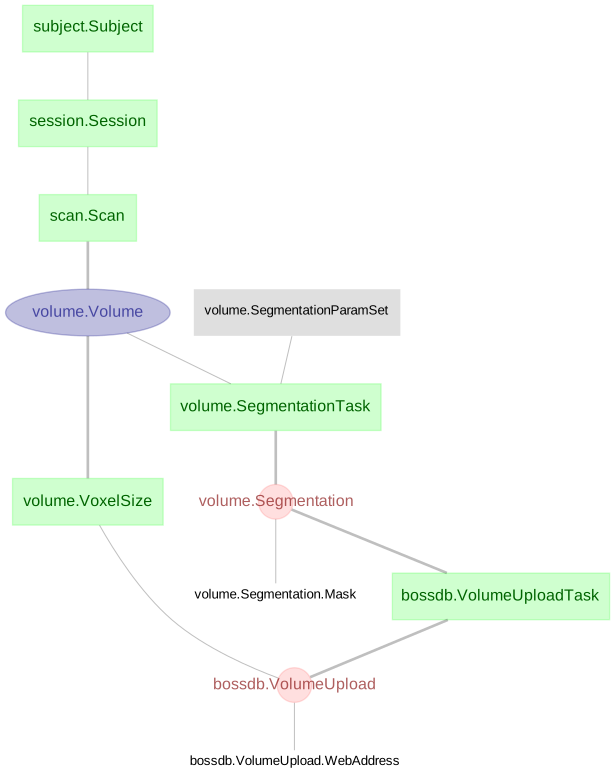
reference schema (API docs)
| Table |
Description |
| Device |
Lab equipment metadata |
subject schema (API docs)
- Although not required, most choose to connect the
Session table to a Subject table.
| Table |
Description |
| Subject |
Basic information of the research subject |
session schema (API docs)
| Table |
Description |
| Session |
Unique experimental session identifier |
| Table |
Description |
| Scan |
A set of imaging scans performed in a single session |
| Table |
Description |
| Volume |
Details about the volumetric microscopic images |
| VoxelSize |
Voxel size information about a volume in millimeters |
| SegmentationParamSet |
Parameters required for segmentation of the volumetric scans |
| SegmentationTask |
Task defined by a combination of Volume and SegmentationParamSet |
| Segmentation |
The core table that executes a SegmentationTask |
| Segmentation.Mask |
Details of the masks identified from the segmentation |
| Table |
Description |
| VolumeUploadTask |
Names of the collection, experiment, and channel where data will be uploaded to BossDB |
| VolumeUpload |
Uploads image and segmentation data to BossDB |
| VolumeUpload.WebAddress |
Stores the BossDB and Neuroglancer URLs for each upload |